Automatic backups and how to restore files from snapshots
By default, we back up all Cito servers automatically each night, and store these backups for 7 days. We back up all site data, MySQL databases, and server configuration.You can browse and restore your site’s files from the dashboard. You can also download copies of files from backups, which is useful if you want to retrieve an older version of a file or directory.To restore MySQL databases please contact Support.
Need custom retention?If you need longer backup retention for your Cito servers, please contact Support. An additional charge may apply.
Viewing snapshots
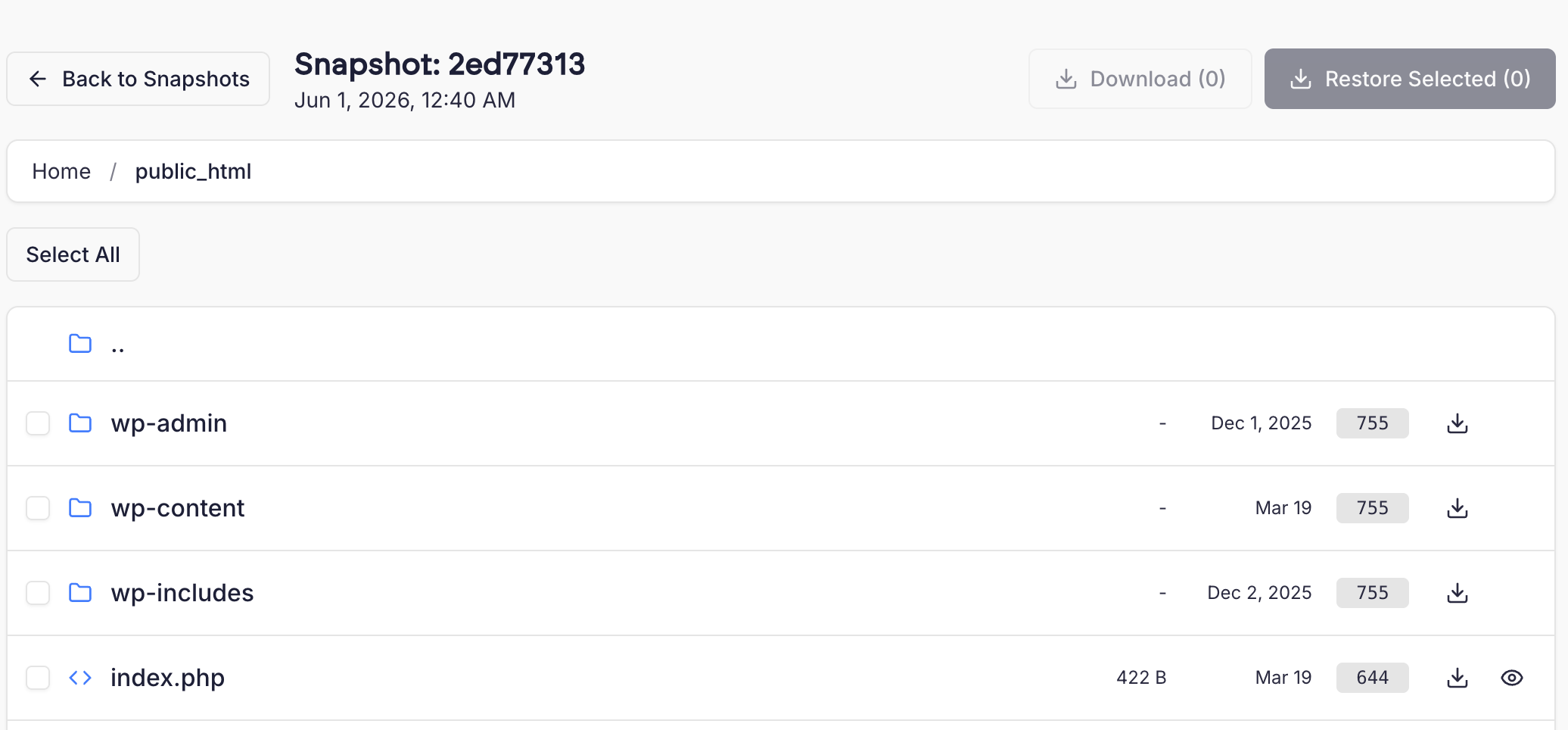
You can view backups by browsing to the Site Settings page and clicking “Backups”. Here you’ll see a list of snapshots we have, including the date and a short snapshot ID.To browse the files in the snapshot, click “Browse”, which opens a File Manager containing the snapshot’s files.You can browse this like a normal directory structure. It’s also possible to view text files- click the eye icon next to a text file to view its contents.
Restoring files
To restore files, select the checkbox next to the directories and files you wish to restore and click ‘Restore selected’ in the top right corner of the page.You’ll be prompted to either Skip or Overwrite existing files.Skip Existing means that if the file or directory you’re trying to restore already exists, we will not overwrite it with the version from the backup snapshot.Overwrite means that we will overwrite files and directories that already exist.When you select an option, you’ll see a progress bar to indicate the status of the restore.
Downloading files
You can also download files and directories directly from backup snapshots. This is useful if you don’t wish to actually restore files, but need to keep a copy or compare between old and new versions.To do this, click the Download icon next to a file or directory. We automatically create a zip archive of directories.Downloads may take a few moments to start.
Restoring databases
To restore MySQL databases please contact Support.
Do not attempt to restore MySQL databases yourself!We take MySQL backups directly using the InnoDB data files on-disk. Please do not attempt to restore these files- you will break MySQL on your server if you try to do so.
{"docsConfig":{"theme":"mint","$schema":"https://mintlify.com/docs.json","name":"Prostack Cito","colors":{"primary":"#1C1F38","light":"#3B4063","dark":"#0F1120"},"logo":{"light":"/logo/logo.png","dark":"/logo/logo.png"},"favicon":"/logo/logo.png","appearance":{"default":"light"},"navbar":{"links":[{"href":"https://feedback.cito.prostack.uk/","label":"Feedback"}],"primary":{"type":"button","label":"Log into Cito","href":"https://cito.prostack.uk"}},"footer":{"socials":{"linkedin":"https://www.linkedin.com/company/prostackhost","x":"https://x.com/prostackhost"}},"integrations":{"telemetry":{"enabled":false}},"navigation":{"pages":[]}},"deployment":{"deploymentMetadataValue":{"hasAudioNarration":false,"customDomains":[],"gitSource":{"type":"github","owner":"local","repo":"local","deployBranch":"main","contentDirectory":"","isPrivate":true,"mountPath":"","label":"local","isBase":true},"buildId":"local","clientVersion":"0.0.4203"},"basePath":"","hasChatPermissions":false,"hasWebMcpPermissions":false,"toggles":[],"googleFontsInlined":false,"isLoggedInCli":false,"mintExport":{}},"customCss":[{"filePath":"style.css","content":":root{--background: #f9f9f9 !important;--bg-background: #f9f9f9 !important;--background-light: 249 249 249 !important;--navbar-background: #f9f9f9 !important}html:not(.dark){background-color:#f9f9f9}html:not(.dark) body{background-color:#f9f9f9}html:not(.dark) #content-container{background-color:#f9f9f9}html:not(.dark) #navbar,html:not(.dark) nav,html:not(.dark) header,html:not(.dark) [class*=\"Navbar\"],html:not(.dark) [class*=\"navbar\"],html:not(.dark) [class*=\"Header\"],html:not(.dark) [class*=\"header\"],html:not(.dark) [class*=\"TopBar\"],html:not(.dark) [class*=\"topbar\"],html:not(.dark) [class*=\"nav-\"],html:not(.dark) [class*=\"scroll\"],html:not(.dark) [class*=\"sticky\"]{background-color:#f9f9f9!important;background:#f9f9f9!important;backdrop-filter:none!important;-webkit-backdrop-filter:none!important}html:not(.dark) [class*=\"Navbar\"]::before,html:not(.dark) [class*=\"Navbar\"]::after,html:not(.dark) header::before,html:not(.dark) header::after,html:not(.dark) nav::before,html:not(.dark) nav::after{background-color:#f9f9f9!important;background:#f9f9f9!important}header a[href=\"/\"],[class*=\"Navbar\"] a[href=\"/\"]{display:inline-flex;align-items:center;gap:0.5rem}header a[href=\"/\"]::after,[class*=\"Navbar\"] a[href=\"/\"]::after{content:\"Cito Documentation\";font-weight:600;font-size:1.1rem;color:#1C1F38;white-space:nowrap}html.dark header a[href=\"/\"]::after,html.dark [class*=\"Navbar\"] a[href=\"/\"]::after{color:white}"}],"page":{"pagePath":"managing-sites/backups","slug":"/managing-sites/backups","pageMetadata":{"title":"Backups","description":"Automatic backups and how to restore files from snapshots","href":"/managing-sites/backups"},"description":{"compiledSource":"\"use strict\";\nconst {jsx: _jsx} = arguments[0];\nconst {useMDXComponents: _provideComponents} = arguments[0];\nfunction _createMdxContent(props) {\n const _components = {\n p: \"p\",\n ..._provideComponents(),\n ...props.components\n };\n return _jsx(_components.p, {\n children: \"Automatic backups and how to restore files from snapshots\"\n });\n}\nfunction MDXContent(props = {}) {\n const {wrapper: MDXLayout} = {\n ..._provideComponents(),\n ...props.components\n };\n return MDXLayout ? _jsx(MDXLayout, {\n ...props,\n children: _jsx(_createMdxContent, {\n ...props\n })\n }) : _createMdxContent(props);\n}\nreturn {\n default: MDXContent\n};\n","frontmatter":{},"scope":{}},"pageType":"default","mdx":{"mdxSource":{"compiledSource":"\"use strict\";const{Fragment:_Fragment,jsx:_jsx,jsxs:_jsxs}=arguments[0];const{useMDXComponents:_provideComponents}=arguments[0];function _createMdxContent(props){const _components={a:`a`,img:`img`,p:`p`,strong:`strong`,..._provideComponents(),...props.components},{Heading,Tip,Warning}=_components;if(!Heading)_missingMdxReference(`Heading`,true);if(!Tip)_missingMdxReference(`Tip`,true);if(!Warning)_missingMdxReference(`Warning`,true);return _jsxs(_Fragment,{children:[_jsx(_components.p,{children:`By default, we back up all Cito servers automatically each night, and store these backups for 7 days. We back up all site data, MySQL databases, and server configuration.`}),`\n`,_jsx(_components.p,{children:`You can browse and restore your site’s files from the dashboard. You can also download copies of files from backups, which is useful if you want to retrieve an older version of a file or directory.`}),`\n`,_jsx(_components.p,{children:`To restore MySQL databases please contact Support.`}),`\n`,_jsxs(Tip,{children:[_jsx(_components.p,{children:_jsx(_components.strong,{children:`Need custom retention?`})}),_jsxs(_components.p,{children:[`If you need longer backup retention for your Cito servers, please `,_jsx(_components.a,{href:`/support/contact`,children:`contact Support`}),`. An additional charge may apply.`]})]}),`\n`,_jsx(Heading,{level:`3`,id:`viewing-snapshots`,children:`Viewing snapshots`}),`\n`,_jsx(_components.p,{children:`You can view backups by browsing to the Site Settings page and clicking “Backups”. Here you’ll see a list of snapshots we have, including the date and a short snapshot ID.`}),`\n`,_jsx(_components.p,{children:_jsx(_components.img,{src:`/images/screenshots/backup-snapshotlist.png`,alt:`Backup Snapshot List`})}),`\n`,_jsx(_components.p,{children:`To browse the files in the snapshot, click “Browse”, which opens a File Manager containing the snapshot’s files.`}),`\n`,_jsx(_components.p,{children:`You can browse this like a normal directory structure. It’s also possible to view text files- click the eye icon next to a text file to view its contents.`}),`\n`,_jsx(_components.p,{children:_jsx(_components.img,{src:`/images/screenshots/backup-filelist.png`,alt:`Backup File List`})}),`\n`,_jsx(Heading,{level:`2`,id:`restoring-files`,children:`Restoring files`}),`\n`,_jsx(_components.p,{children:`To restore files, select the checkbox next to the directories and files you wish to restore and click ‘Restore selected’ in the top right corner of the page.`}),`\n`,_jsxs(_components.p,{children:[`You’ll be prompted to either `,_jsx(_components.strong,{children:`Skip`}),` or `,_jsx(_components.strong,{children:`Overwrite`}),` existing files.`]}),`\n`,_jsx(_components.p,{children:_jsx(_components.img,{src:`/images/screenshots/backup-restorescreen.png`,alt:`Backup Restore Screen`})}),`\n`,_jsxs(_components.p,{children:[_jsx(_components.strong,{children:`Skip Existing`}),` means that if the file or directory you’re trying to restore already exists, we will not overwrite it with the version from the backup snapshot.`]}),`\n`,_jsxs(_components.p,{children:[_jsx(_components.strong,{children:`Overwrite`}),` means that we will overwrite files and directories that already exist.`]}),`\n`,_jsx(_components.p,{children:`When you select an option, you’ll see a progress bar to indicate the status of the restore.`}),`\n`,_jsx(Heading,{level:`2`,id:`downloading-files`,children:`Downloading files`}),`\n`,_jsx(_components.p,{children:`You can also download files and directories directly from backup snapshots. This is useful if you don’t wish to actually restore files, but need to keep a copy or compare between old and new versions.`}),`\n`,_jsx(_components.p,{children:`To do this, click the Download icon next to a file or directory. We automatically create a zip archive of directories.`}),`\n`,_jsx(_components.p,{children:`Downloads may take a few moments to start.`}),`\n`,_jsx(Heading,{level:`2`,id:`restoring-databases`,children:`Restoring databases`}),`\n`,_jsx(_components.p,{children:`To restore MySQL databases please contact Support.`}),`\n`,_jsxs(Warning,{children:[_jsx(_components.p,{children:_jsx(_components.strong,{children:`Do not attempt to restore MySQL databases yourself!`})}),_jsx(_components.p,{children:`We take MySQL backups directly using the InnoDB data files on-disk. Please do not attempt to restore these files- you will break MySQL on your server if you try to do so.`})]})]})}function MDXContent(props={}){const{wrapper:MDXLayout}={..._provideComponents(),...props.components};return MDXLayout?_jsx(MDXLayout,{...props,children:_jsx(_createMdxContent,{...props})}):_createMdxContent(props)}return{default:MDXContent};function _missingMdxReference(id,component){throw new Error(`Expected `+(component?`component`:`object`)+\" `\"+id+\"` to be defined: you likely forgot to import, pass, or provide it.\")}","frontmatter":{},"scope":{"config":{},"pageMetadata":{"title":"Backups","description":"Automatic backups and how to restore files from snapshots","href":"/managing-sites/backups"}}},"mdxSourceWithNoJs":null},"mdxExtracts":{"tableOfContents":[{"title":"Viewing snapshots","slug":"viewing-snapshots","depth":3,"children":[]},{"title":"Restoring files","slug":"restoring-files","depth":2,"children":[]},{"title":"Downloading files","slug":"downloading-files","depth":2,"children":[]},{"title":"Restoring databases","slug":"restoring-databases","depth":2,"children":[]}],"codeExamples":{}},"jsLinks":[],"subdomain":"localhost","siteName":"Prostack Cito","title":"Backups - Prostack Cito","navMaps":{"firstHrefInVersion":{},"firstHrefInLanguage":{}},"originalFileLocation":"managing-sites/backups.mdx"},"headHtml":"\u003cscript data-mint-head>(function(){var d=document.documentElement,p=null;if(!p){try{p=localStorage.getItem(\"isDarkMode\")}catch(e){}if(p==='true')p='dark';else if(p==='false')p='light';if(p!=='light'\u0026\u0026p!=='dark'\u0026\u0026p!=='system')p=\"light\"}var r=p==='system'?(matchMedia(\"(prefers-color-scheme: dark)\").matches?'dark':'light'):p;d.classList.remove(r==='dark'?'light':'dark');d.classList.add(r);d.setAttribute(\"data-theme-preference\",p)})();\u003c/script>\u003cmeta data-mint-head name=\"description\" content=\"Automatic backups and how to restore files from snapshots\">\u003cmeta data-mint-head name=\"application-name\" content=\"Prostack Cito\">\u003cmeta data-mint-head name=\"generator\" content=\"Mintlify\">\u003clink data-mint-head rel=\"apple-touch-icon\" type=\"image/png\" sizes=\"180x180\" href=\"/favicons/apple-touch-icon.png\">\u003clink data-mint-head rel=\"icon\" type=\"image/png\" sizes=\"32x32\" href=\"/favicons/favicon-32x32.png\">\u003clink data-mint-head rel=\"icon\" type=\"image/png\" sizes=\"16x16\" href=\"/favicons/favicon-16x16.png\">\u003clink data-mint-head rel=\"shortcut icon\" type=\"image/x-icon\" href=\"/favicons/favicon.ico\">\u003cmeta data-mint-head property=\"og:title\" content=\"Backups - Prostack Cito\">\u003cmeta data-mint-head property=\"og:description\" content=\"Automatic backups and how to restore files from snapshots\">\u003cmeta data-mint-head property=\"og:site_name\" content=\"Prostack Cito\">\u003cmeta data-mint-head property=\"og:url\" content=\"https://local./managing-sites/backups\">\u003cmeta data-mint-head property=\"og:type\" content=\"website\">\u003cmeta data-mint-head name=\"twitter:card\" content=\"summary_large_image\">\u003cmeta data-mint-head name=\"twitter:title\" content=\"Backups - Prostack Cito\">\u003cmeta data-mint-head name=\"twitter:description\" content=\"Automatic backups and how to restore files from snapshots\">\u003cmeta data-mint-head name=\"msapplication-config\" content=\"/favicons/browserconfig.xml\">\u003cmeta data-mint-head name=\"apple-mobile-web-app-title\" content=\"Prostack Cito\">\u003cmeta data-mint-head name=\"msapplication-TileColor\" content=\"#1C1F38\">\u003clink data-mint-head rel=\"canonical\" href=\"https://local./managing-sites/backups\">\u003clink data-mint-head rel=\"alternate\" type=\"application/xml\" href=\"/sitemap.xml\">\u003clink data-mint-head rel=\"alternate\" type=\"text/markdown\" href=\"/managing-sites/backups.md\">\u003cscript data-mint-head type=\"application/ld+json\">{\"@context\":\"https://schema.org\",\"@type\":\"WebSite\",\"name\":\"Prostack Cito\",\"publisher\":{\"@type\":\"Organization\",\"name\":\"Prostack Cito\"},\"provider\":{\"@type\":\"Organization\",\"name\":\"Mintlify\",\"url\":\"https://mintlify.com\"}}\u003c/script>","agentPointerHref":"/managing-sites/backups.md","siteName":"Prostack Cito","nav":{"groups":[{"group":"Home","pages":[{"title":"Introduction","href":"/index"}]},{"group":"Getting Started","pages":[{"title":"First Steps","href":"/getting-started/index"},{"title":"Generating SSH Keys","href":"/getting-started/ssh-keys"},{"title":"Migrating from another host","href":"/getting-started/migration"},{"title":"Frequently Asked Questions","href":"/getting-started/faq"}]},{"group":"Creating Sites","pages":[{"title":"Adding a New Site","href":"/creating-sites/overview"},{"title":"Installing WordPress","href":"/creating-sites/wordpress"},{"title":"NodeJS Applications","href":"/creating-sites/nodejs"},{"title":"Proxy Pass","href":"/creating-sites/proxy-pass"}]},{"group":"Containers","pages":[{"title":"Container Sites","href":"/creating-sites/docker"},{"title":"Importing from Docker Compose","href":"/creating-sites/docker-compose"},{"title":"Managing Containers","href":"/managing-sites/containers"},{"title":"Services","href":"/managing-sites/container-services"},{"title":"Converting a Proxy Pass Site","href":"/managing-sites/convert-proxy-site"},{"title":"Container Limits","href":"/managing-sites/container-limits"}]},{"group":"Managing Sites","pages":[{"title":"Sites Overview","href":"/managing-sites/overview"},{"title":"Changing PHP Versions","href":"/managing-sites/php-version"},{"title":"Custom Document Roots","href":"/managing-sites/document-root"},{"title":"Preview URLs","href":"/managing-sites/preview"},{"title":"Cloning Sites","href":"/managing-sites/clone"},{"title":"Renaming Sites","href":"/managing-sites/rename"},{"title":"Suspending Sites","href":"/managing-sites/suspend"},{"title":"Deleting Sites","href":"/managing-sites/delete"},{"title":".htaccess Import","href":"/managing-sites/htaccess-import"}]},{"group":"Domains, SSL \u0026 Email","pages":[{"title":"Aliases","href":"/managing-sites/aliases"},{"title":"Redirects","href":"/managing-sites/redirects"},{"title":"Domain Information","href":"/managing-sites/domain-information"},{"title":"SSL Certificates","href":"/cli/ssl"},{"title":"Email","href":"/managing-sites/email"}]},{"group":"Files \u0026 Databases","pages":[{"title":"File Manager","href":"/managing-sites/file-manager"},{"title":"Managing MySQL Databases","href":"/managing-sites/mysql"},{"title":"Database Ownership","description":"How Cito tracks MySQL database ownership and handles orphaned databases","href":"/managing-sites/database-ownership"},{"title":"Backups","href":"/managing-sites/backups"}]},{"group":"Security","pages":[{"title":"Password Protection","description":"Protect your Cito sites with HTTP Basic Auth","href":"/managing-sites/password-protection"},{"title":"IP Blocking","href":"/managing-sites/ip-blocking"},{"title":"Bot \u0026 Crawler Blocking","href":"/managing-sites/bot-blocking"},{"title":"Firewall","href":"/managing-sites/firewall"},{"title":"Malware Protection","href":"/managing-sites/security"}]},{"group":"Performance \u0026 Monitoring","pages":[{"title":"Caching","href":"/managing-sites/caching"},{"title":"Analytics","href":"/managing-sites/analytics"},{"title":"Viewing Logs","href":"/managing-sites/logs"}]},{"group":"Deployment \u0026 Automation","pages":[{"title":"SSH","href":"/deploying/ssh"},{"title":"Working with Git","href":"/deploying/git"},{"title":"Cron Jobs","href":"/managing-sites/crons"},{"title":"MCP Server (beta)","href":"/deploying/mcp"}]},{"group":"Server Configuration","pages":[{"title":"Nginx","href":"/cli/nginx"},{"title":"PHP","href":"/cli/php"}]},{"group":"Account","pages":[{"title":"User Management","href":"/account/authentication"},{"title":"Audit Logs","href":"/account/audit-logs"}]},{"group":"Support","pages":[{"title":"Getting Support","href":"/support/contact"},{"title":"Changelog","href":"/support/changelog"}]}]},"basePath":"","title":"Backups - Prostack Cito","buildId":"3fee6f877672","dynamics":["a74be98ba7"],"chunks":["zoom-image-lightbox-sgQzkCp-.js","lightbox-handle-r17bVUz3.js"]}

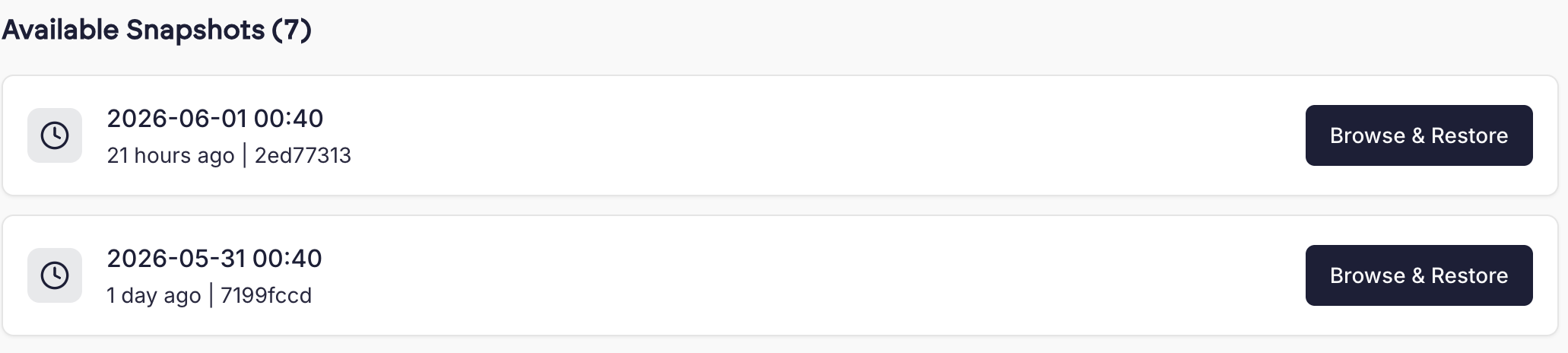 To browse the files in the snapshot, click “Browse”, which opens a File Manager containing the snapshot’s files.
You can browse this like a normal directory structure. It’s also possible to view text files- click the eye icon next to a text file to view its contents.
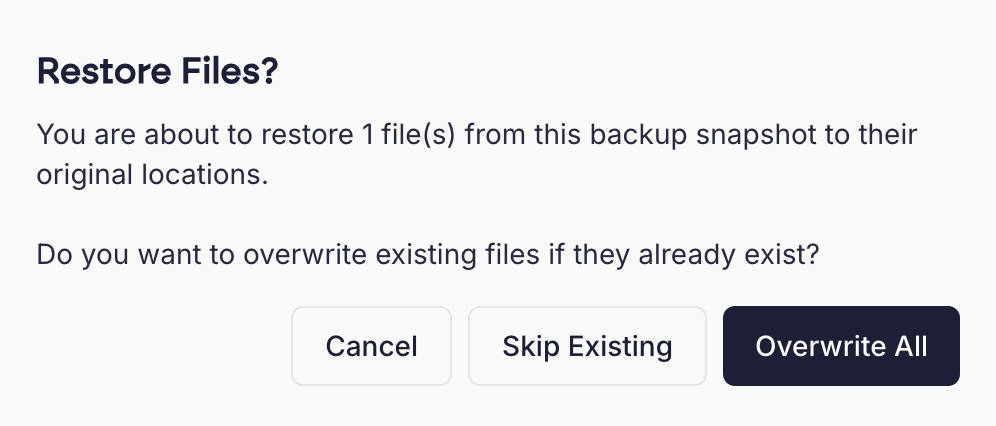 Skip Existing means that if the file or directory you’re trying to restore already exists, we will not overwrite it with the version from the backup snapshot.
Overwrite means that we will overwrite files and directories that already exist.
When you select an option, you’ll see a progress bar to indicate the status of the restore.