Browse, upload, download and edit files using the built-in file manager
Cito has a file manager built in which allows you to browse, upload, download and edit files. This is useful as an alternative to using SFTP to manage your site.You can find the file manager under Site Settings.The file manager can be expanded to fill the dashboard window by clicking the Full Screen toggle on the right hand side of the toolbar.
Modes
The file manager has two modes: browsing (the default) and select. In select mode (which you can toggle with the checkbox icon to the left of the toolbar), you are able to select multiple files and perform bulk actions on them.
The context menu
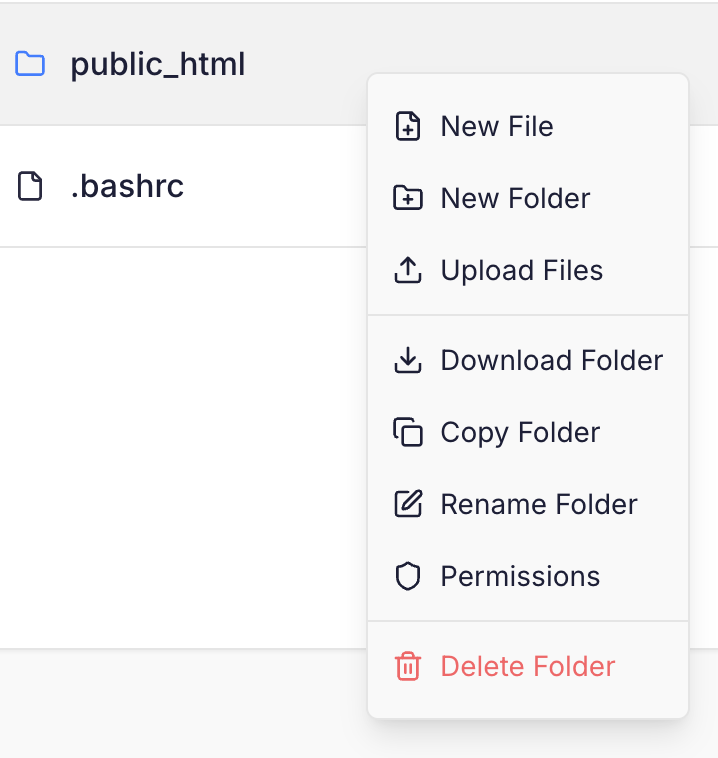
Right click anywhere in the file manager to bring up the context menu. This menu has various options for files and directories, including editing or modifying permissions:
Uploading files
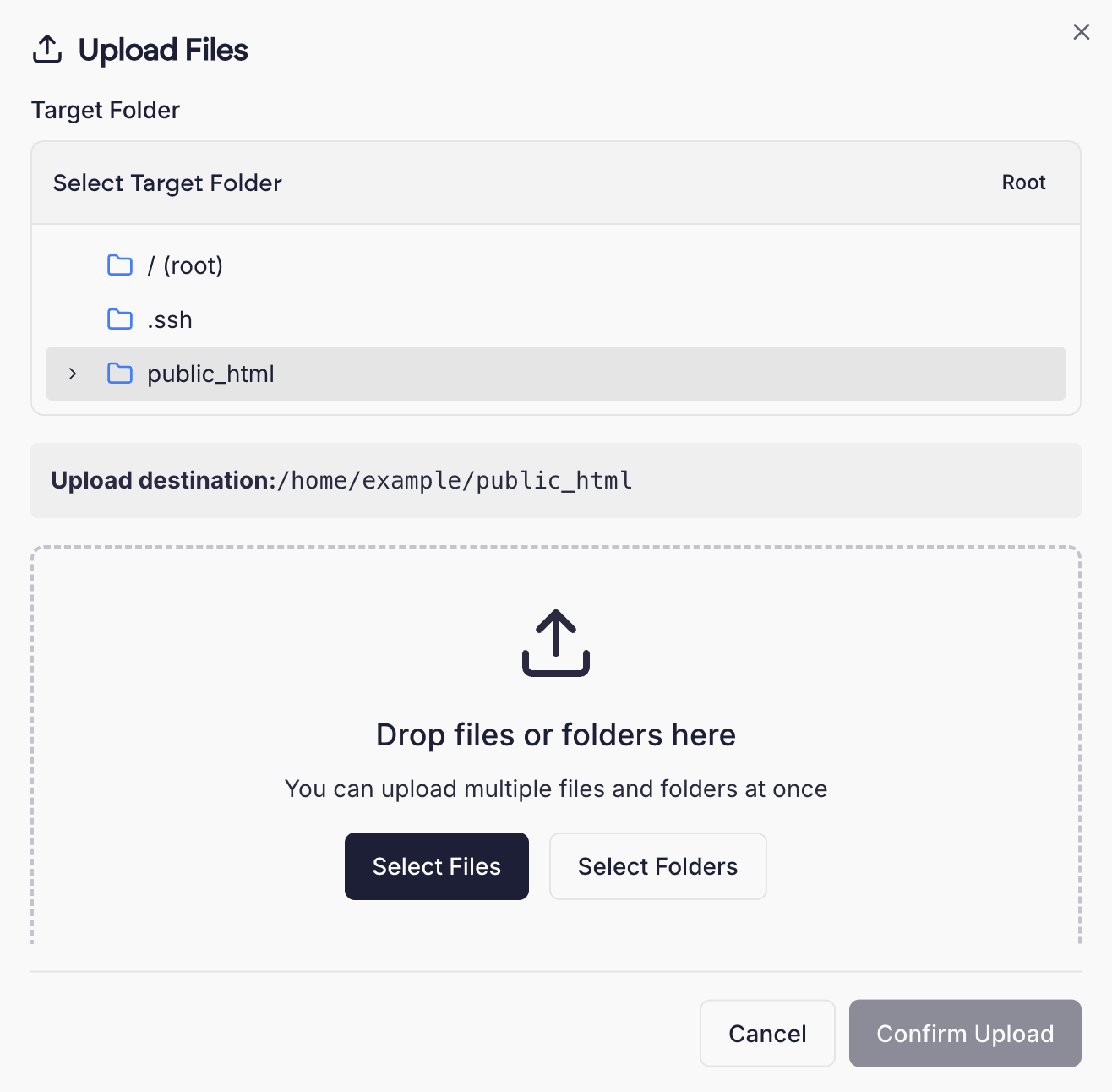
Click the upload button in the toolbar to open the Upload dialog box. Here you can upload files, either by dragging and dropping them into the window, or by selecting them via your local file system.
Editing files
Right click on a file and select Edit to bring up the code editor. This allows you to edit text files such as HTML, CSS, and PHP.The code editor automatically opens the file manager in full screen mode.
Copy and paste
The file manager has copy and paste functionality. You are able to right click files and select copy. You can then navigate to another directory and paste those files to move them to that location.
Permissions
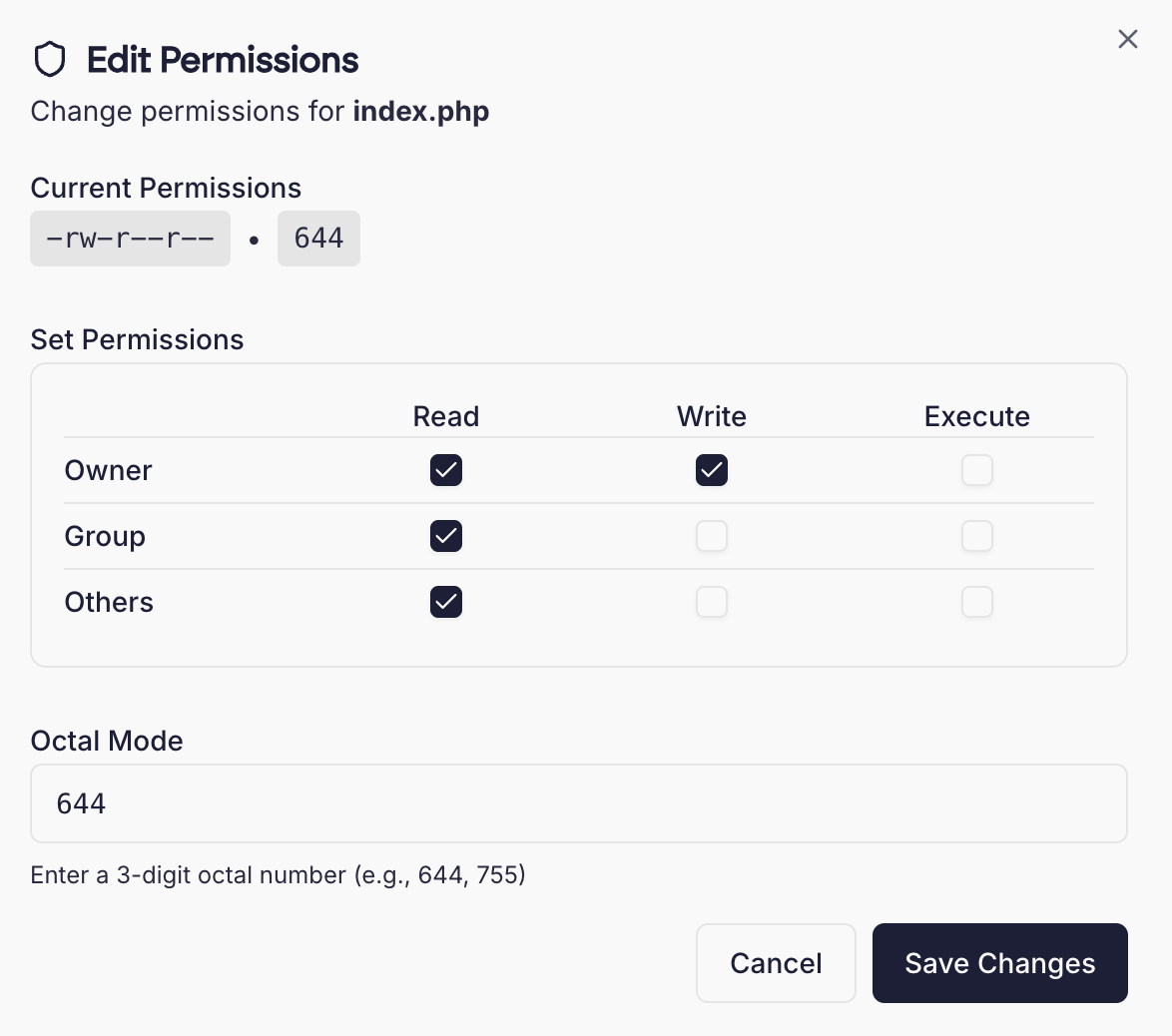
To modify a file or folder’s permissions, right click on the file/folder and select “Permissions”.You can set permissions using the checkboxes or enter an octal string (e.g. 644) directly.
Take care when editing permissionsPermissions should be edited with caution. In general, files should have 644 permissions and directories 755.
Setting broader permissions (such as 777) can introduce security risks.
Zip & Unzip
You can extract or compress files in zip format in the File Manager.To unzip, right click on any .zip file and select “Extract”. You can choose a destination to unzip to.To create a new zip archive, select one or more files, then click “Compress selected”.
Container sites
On container sites, folders mounted into a container as a volume show a volume badge with the service and path they’re mounted at, e.g. volume · web:/app/uploads.Files written by a container process that runs as its own user, such as a Postgres or Redis service, are owned by a container user rather than your site user. These show a container data badge and can’t be opened or changed in the file manager. Manage them from the service’s shell instead.Container sites don’t have a public_html directory.
{"docsConfig":{"theme":"mint","$schema":"https://mintlify.com/docs.json","name":"Prostack Cito","colors":{"primary":"#1C1F38","light":"#3B4063","dark":"#0F1120"},"logo":{"light":"/logo/logo.png","dark":"/logo/logo.png"},"favicon":"/logo/logo.png","appearance":{"default":"light"},"navbar":{"links":[{"href":"https://feedback.cito.prostack.uk/","label":"Feedback"}],"primary":{"type":"button","label":"Log into Cito","href":"https://cito.prostack.uk"}},"footer":{"socials":{"linkedin":"https://www.linkedin.com/company/prostackhost","x":"https://x.com/prostackhost"}},"integrations":{"telemetry":{"enabled":false}},"navigation":{"pages":[]}},"deployment":{"deploymentMetadataValue":{"hasAudioNarration":false,"customDomains":[],"gitSource":{"type":"github","owner":"local","repo":"local","deployBranch":"main","contentDirectory":"","isPrivate":true,"mountPath":"","label":"local","isBase":true},"buildId":"local","clientVersion":"0.0.4203"},"basePath":"","hasChatPermissions":false,"hasWebMcpPermissions":false,"toggles":[],"googleFontsInlined":false,"isLoggedInCli":false,"mintExport":{}},"customCss":[{"filePath":"style.css","content":":root{--background: #f9f9f9 !important;--bg-background: #f9f9f9 !important;--background-light: 249 249 249 !important;--navbar-background: #f9f9f9 !important}html:not(.dark){background-color:#f9f9f9}html:not(.dark) body{background-color:#f9f9f9}html:not(.dark) #content-container{background-color:#f9f9f9}html:not(.dark) #navbar,html:not(.dark) nav,html:not(.dark) header,html:not(.dark) [class*=\"Navbar\"],html:not(.dark) [class*=\"navbar\"],html:not(.dark) [class*=\"Header\"],html:not(.dark) [class*=\"header\"],html:not(.dark) [class*=\"TopBar\"],html:not(.dark) [class*=\"topbar\"],html:not(.dark) [class*=\"nav-\"],html:not(.dark) [class*=\"scroll\"],html:not(.dark) [class*=\"sticky\"]{background-color:#f9f9f9!important;background:#f9f9f9!important;backdrop-filter:none!important;-webkit-backdrop-filter:none!important}html:not(.dark) [class*=\"Navbar\"]::before,html:not(.dark) [class*=\"Navbar\"]::after,html:not(.dark) header::before,html:not(.dark) header::after,html:not(.dark) nav::before,html:not(.dark) nav::after{background-color:#f9f9f9!important;background:#f9f9f9!important}header a[href=\"/\"],[class*=\"Navbar\"] a[href=\"/\"]{display:inline-flex;align-items:center;gap:0.5rem}header a[href=\"/\"]::after,[class*=\"Navbar\"] a[href=\"/\"]::after{content:\"Cito Documentation\";font-weight:600;font-size:1.1rem;color:#1C1F38;white-space:nowrap}html.dark header a[href=\"/\"]::after,html.dark [class*=\"Navbar\"] a[href=\"/\"]::after{color:white}"}],"page":{"pagePath":"managing-sites/file-manager","slug":"/managing-sites/file-manager","pageMetadata":{"title":"File Manager","description":"Browse, upload, download and edit files using the built-in file manager","href":"/managing-sites/file-manager"},"description":{"compiledSource":"\"use strict\";\nconst {jsx: _jsx} = arguments[0];\nconst {useMDXComponents: _provideComponents} = arguments[0];\nfunction _createMdxContent(props) {\n const _components = {\n p: \"p\",\n ..._provideComponents(),\n ...props.components\n };\n return _jsx(_components.p, {\n children: \"Browse, upload, download and edit files using the built-in file manager\"\n });\n}\nfunction MDXContent(props = {}) {\n const {wrapper: MDXLayout} = {\n ..._provideComponents(),\n ...props.components\n };\n return MDXLayout ? _jsx(MDXLayout, {\n ...props,\n children: _jsx(_createMdxContent, {\n ...props\n })\n }) : _createMdxContent(props);\n}\nreturn {\n default: MDXContent\n};\n","frontmatter":{},"scope":{}},"pageType":"default","mdx":{"mdxSource":{"compiledSource":"\"use strict\";const{Fragment:_Fragment,jsx:_jsx,jsxs:_jsxs}=arguments[0];const{useMDXComponents:_provideComponents}=arguments[0];function _createMdxContent(props){const _components={a:`a`,code:`code`,img:`img`,p:`p`,strong:`strong`,..._provideComponents(),...props.components},{Heading,Warning}=_components;if(!Heading)_missingMdxReference(`Heading`,true);if(!Warning)_missingMdxReference(`Warning`,true);return _jsxs(_Fragment,{children:[_jsx(_components.p,{children:`Cito has a file manager built in which allows you to browse, upload, download and edit files. This is useful as an alternative to using SFTP to manage your site.`}),`\n`,_jsx(_components.p,{children:`You can find the file manager under Site Settings.`}),`\n`,_jsx(_components.p,{children:_jsx(_components.img,{src:`/images/screenshots/fmoverview.png`,alt:`File Manager Overview`})}),`\n`,_jsx(_components.p,{children:`The file manager can be expanded to fill the dashboard window by clicking the Full Screen toggle on the right hand side of the toolbar.`}),`\n`,_jsx(Heading,{level:`2`,id:`modes`,children:`Modes`}),`\n`,_jsx(_components.p,{children:`The file manager has two modes: browsing (the default) and select. In select mode (which you can toggle with the checkbox icon to the left of the toolbar), you are able to select multiple files and perform bulk actions on them.`}),`\n`,_jsx(Heading,{level:`2`,id:`the-context-menu`,children:`The context menu`}),`\n`,_jsx(_components.p,{children:`Right click anywhere in the file manager to bring up the context menu. This menu has various options for files and directories, including editing or modifying permissions:`}),`\n`,_jsx(_components.p,{children:_jsx(_components.img,{src:`/images/screenshots/fmrightclick.png`,alt:`Context Menu`})}),`\n`,_jsx(Heading,{level:`2`,id:`uploading-files`,children:`Uploading files`}),`\n`,_jsx(_components.p,{children:`Click the upload button in the toolbar to open the Upload dialog box. Here you can upload files, either by dragging and dropping them into the window, or by selecting them via your local file system.`}),`\n`,_jsx(_components.p,{children:_jsx(_components.img,{src:`/images/screenshots/fmupload.png`,alt:`Upload Files`})}),`\n`,_jsx(Heading,{level:`2`,id:`editing-files`,children:`Editing files`}),`\n`,_jsxs(_components.p,{children:[`Right click on a file and select `,_jsx(_components.strong,{children:`Edit`}),` to bring up the code editor. This allows you to edit text files such as HTML, CSS, and PHP.`]}),`\n`,_jsx(_components.p,{children:_jsx(_components.img,{src:`/images/screenshots/fmedit.png`,alt:`Edit File`})}),`\n`,_jsx(_components.p,{children:`The code editor automatically opens the file manager in full screen mode.`}),`\n`,_jsx(Heading,{level:`2`,id:`copy-and-paste`,children:`Copy and paste`}),`\n`,_jsx(_components.p,{children:`The file manager has copy and paste functionality. You are able to right click files and select copy. You can then navigate to another directory and paste those files to move them to that location.`}),`\n`,_jsx(Heading,{level:`2`,id:`permissions`,children:`Permissions`}),`\n`,_jsx(_components.p,{children:`To modify a file or folder’s permissions, right click on the file/folder and select “Permissions”.`}),`\n`,_jsxs(_components.p,{children:[`You can set permissions using the checkboxes or enter an octal string (e.g. `,_jsx(_components.code,{children:`644`}),`) directly.`]}),`\n`,_jsx(_components.p,{children:_jsx(_components.img,{src:`/images/screenshots/fmpermissions.png`,alt:`Permissions`})}),`\n`,_jsxs(Warning,{children:[_jsx(_components.p,{children:_jsx(_components.strong,{children:`Take care when editing permissions`})}),_jsxs(_components.p,{children:[`Permissions should be edited with caution. In general, files should have `,_jsx(_components.code,{children:`644`}),` permissions and directories `,_jsx(_components.code,{children:`755`}),`.\nSetting broader permissions (such as `,_jsx(_components.code,{children:`777`}),`) can introduce security risks.`]})]}),`\n`,_jsx(Heading,{level:`2`,id:`zip-\u0026-unzip`,children:`Zip \u0026 Unzip`}),`\n`,_jsx(_components.p,{children:`You can extract or compress files in zip format in the File Manager.`}),`\n`,_jsxs(_components.p,{children:[`To unzip, right click on any `,_jsx(_components.code,{children:`.zip`}),` file and select “Extract”. You can choose a destination to unzip to.`]}),`\n`,_jsx(_components.p,{children:`To create a new zip archive, select one or more files, then click “Compress selected”.`}),`\n`,_jsx(Heading,{level:`2`,id:`container-sites`,children:`Container sites`}),`\n`,_jsxs(_components.p,{children:[`On `,_jsx(_components.a,{href:`/creating-sites/docker`,children:`container sites`}),`, folders mounted into a container as a `,_jsx(_components.a,{href:`/managing-sites/containers#volumes`,children:`volume`}),` show a `,_jsx(_components.strong,{children:`volume`}),` badge with the service and path they’re mounted at, e.g. `,_jsx(_components.code,{children:`volume · web:/app/uploads`}),`.`]}),`\n`,_jsxs(_components.p,{children:[`Files written by a container process that runs as its own user, such as a Postgres or Redis service, are owned by a container user rather than your site user. These show a `,_jsx(_components.strong,{children:`container data`}),` badge and can’t be opened or changed in the file manager. Manage them from the service’s `,_jsx(_components.a,{href:`/managing-sites/containers#shell`,children:`shell`}),` instead.`]}),`\n`,_jsxs(_components.p,{children:[`Container sites don’t have a `,_jsx(_components.code,{children:`public_html`}),` directory.`]})]})}function MDXContent(props={}){const{wrapper:MDXLayout}={..._provideComponents(),...props.components};return MDXLayout?_jsx(MDXLayout,{...props,children:_jsx(_createMdxContent,{...props})}):_createMdxContent(props)}return{default:MDXContent};function _missingMdxReference(id,component){throw new Error(`Expected `+(component?`component`:`object`)+\" `\"+id+\"` to be defined: you likely forgot to import, pass, or provide it.\")}","frontmatter":{},"scope":{"config":{},"pageMetadata":{"title":"File Manager","description":"Browse, upload, download and edit files using the built-in file manager","href":"/managing-sites/file-manager"}}},"mdxSourceWithNoJs":null},"mdxExtracts":{"tableOfContents":[{"title":"Modes","slug":"modes","depth":2,"children":[]},{"title":"The context menu","slug":"the-context-menu","depth":2,"children":[]},{"title":"Uploading files","slug":"uploading-files","depth":2,"children":[]},{"title":"Editing files","slug":"editing-files","depth":2,"children":[]},{"title":"Copy and paste","slug":"copy-and-paste","depth":2,"children":[]},{"title":"Permissions","slug":"permissions","depth":2,"children":[]},{"title":"Zip \u0026 Unzip","slug":"zip-\u0026-unzip","depth":2,"children":[]},{"title":"Container sites","slug":"container-sites","depth":2,"children":[]}],"codeExamples":{}},"jsLinks":[],"subdomain":"localhost","siteName":"Prostack Cito","title":"File Manager - Prostack Cito","navMaps":{"firstHrefInVersion":{},"firstHrefInLanguage":{}},"originalFileLocation":"managing-sites/file-manager.mdx"},"headHtml":"\u003cscript data-mint-head>(function(){var d=document.documentElement,p=null;if(!p){try{p=localStorage.getItem(\"isDarkMode\")}catch(e){}if(p==='true')p='dark';else if(p==='false')p='light';if(p!=='light'\u0026\u0026p!=='dark'\u0026\u0026p!=='system')p=\"light\"}var r=p==='system'?(matchMedia(\"(prefers-color-scheme: dark)\").matches?'dark':'light'):p;d.classList.remove(r==='dark'?'light':'dark');d.classList.add(r);d.setAttribute(\"data-theme-preference\",p)})();\u003c/script>\u003cmeta data-mint-head name=\"description\" content=\"Browse, upload, download and edit files using the built-in file manager\">\u003cmeta data-mint-head name=\"application-name\" content=\"Prostack Cito\">\u003cmeta data-mint-head name=\"generator\" content=\"Mintlify\">\u003clink data-mint-head rel=\"apple-touch-icon\" type=\"image/png\" sizes=\"180x180\" href=\"/favicons/apple-touch-icon.png\">\u003clink data-mint-head rel=\"icon\" type=\"image/png\" sizes=\"32x32\" href=\"/favicons/favicon-32x32.png\">\u003clink data-mint-head rel=\"icon\" type=\"image/png\" sizes=\"16x16\" href=\"/favicons/favicon-16x16.png\">\u003clink data-mint-head rel=\"shortcut icon\" type=\"image/x-icon\" href=\"/favicons/favicon.ico\">\u003cmeta data-mint-head property=\"og:title\" content=\"File Manager - Prostack Cito\">\u003cmeta data-mint-head property=\"og:description\" content=\"Browse, upload, download and edit files using the built-in file manager\">\u003cmeta data-mint-head property=\"og:site_name\" content=\"Prostack Cito\">\u003cmeta data-mint-head property=\"og:url\" content=\"https://local./managing-sites/file-manager\">\u003cmeta data-mint-head property=\"og:type\" content=\"website\">\u003cmeta data-mint-head name=\"twitter:card\" content=\"summary_large_image\">\u003cmeta data-mint-head name=\"twitter:title\" content=\"File Manager - Prostack Cito\">\u003cmeta data-mint-head name=\"twitter:description\" content=\"Browse, upload, download and edit files using the built-in file manager\">\u003cmeta data-mint-head name=\"msapplication-config\" content=\"/favicons/browserconfig.xml\">\u003cmeta data-mint-head name=\"apple-mobile-web-app-title\" content=\"Prostack Cito\">\u003cmeta data-mint-head name=\"msapplication-TileColor\" content=\"#1C1F38\">\u003clink data-mint-head rel=\"canonical\" href=\"https://local./managing-sites/file-manager\">\u003clink data-mint-head rel=\"alternate\" type=\"application/xml\" href=\"/sitemap.xml\">\u003clink data-mint-head rel=\"alternate\" type=\"text/markdown\" href=\"/managing-sites/file-manager.md\">\u003cscript data-mint-head type=\"application/ld+json\">{\"@context\":\"https://schema.org\",\"@type\":\"WebSite\",\"name\":\"Prostack Cito\",\"publisher\":{\"@type\":\"Organization\",\"name\":\"Prostack Cito\"},\"provider\":{\"@type\":\"Organization\",\"name\":\"Mintlify\",\"url\":\"https://mintlify.com\"}}\u003c/script>","agentPointerHref":"/managing-sites/file-manager.md","siteName":"Prostack Cito","nav":{"groups":[{"group":"Home","pages":[{"title":"Introduction","href":"/index"}]},{"group":"Getting Started","pages":[{"title":"First Steps","href":"/getting-started/index"},{"title":"Generating SSH Keys","href":"/getting-started/ssh-keys"},{"title":"Migrating from another host","href":"/getting-started/migration"},{"title":"Frequently Asked Questions","href":"/getting-started/faq"}]},{"group":"Creating Sites","pages":[{"title":"Adding a New Site","href":"/creating-sites/overview"},{"title":"Installing WordPress","href":"/creating-sites/wordpress"},{"title":"NodeJS Applications","href":"/creating-sites/nodejs"},{"title":"Proxy Pass","href":"/creating-sites/proxy-pass"}]},{"group":"Containers","pages":[{"title":"Container Sites","href":"/creating-sites/docker"},{"title":"Importing from Docker Compose","href":"/creating-sites/docker-compose"},{"title":"Managing Containers","href":"/managing-sites/containers"},{"title":"Services","href":"/managing-sites/container-services"},{"title":"Converting a Proxy Pass Site","href":"/managing-sites/convert-proxy-site"},{"title":"Container Limits","href":"/managing-sites/container-limits"}]},{"group":"Managing Sites","pages":[{"title":"Sites Overview","href":"/managing-sites/overview"},{"title":"Changing PHP Versions","href":"/managing-sites/php-version"},{"title":"Custom Document Roots","href":"/managing-sites/document-root"},{"title":"Preview URLs","href":"/managing-sites/preview"},{"title":"Cloning Sites","href":"/managing-sites/clone"},{"title":"Renaming Sites","href":"/managing-sites/rename"},{"title":"Suspending Sites","href":"/managing-sites/suspend"},{"title":"Deleting Sites","href":"/managing-sites/delete"},{"title":".htaccess Import","href":"/managing-sites/htaccess-import"}]},{"group":"Domains, SSL \u0026 Email","pages":[{"title":"Aliases","href":"/managing-sites/aliases"},{"title":"Redirects","href":"/managing-sites/redirects"},{"title":"Domain Information","href":"/managing-sites/domain-information"},{"title":"SSL Certificates","href":"/cli/ssl"},{"title":"Email","description":"Outgoing email configuration, logs, DKIM, SPF, and DMARC","href":"/managing-sites/email"}]},{"group":"Files \u0026 Databases","pages":[{"title":"File Manager","href":"/managing-sites/file-manager"},{"title":"Managing MySQL Databases","description":"Create, manage, and clone MySQL databases in Cito","href":"/managing-sites/mysql"},{"title":"Database Ownership","href":"/managing-sites/database-ownership"},{"title":"Backups","href":"/managing-sites/backups"}]},{"group":"Security","pages":[{"title":"Password Protection","href":"/managing-sites/password-protection"},{"title":"IP Blocking","href":"/managing-sites/ip-blocking"},{"title":"Bot \u0026 Crawler Blocking","href":"/managing-sites/bot-blocking"},{"title":"Firewall","href":"/managing-sites/firewall"},{"title":"Malware Protection","href":"/managing-sites/security"}]},{"group":"Performance \u0026 Monitoring","pages":[{"title":"Caching","href":"/managing-sites/caching"},{"title":"Analytics","href":"/managing-sites/analytics"},{"title":"Viewing Logs","href":"/managing-sites/logs"}]},{"group":"Deployment \u0026 Automation","pages":[{"title":"SSH","href":"/deploying/ssh"},{"title":"Working with Git","href":"/deploying/git"},{"title":"Cron Jobs","href":"/managing-sites/crons"},{"title":"MCP Server (beta)","href":"/deploying/mcp"}]},{"group":"Server Configuration","pages":[{"title":"Nginx","href":"/cli/nginx"},{"title":"PHP","href":"/cli/php"}]},{"group":"Account","pages":[{"title":"User Management","href":"/account/authentication"},{"title":"Audit Logs","href":"/account/audit-logs"}]},{"group":"Support","pages":[{"title":"Getting Support","href":"/support/contact"},{"title":"Changelog","href":"/support/changelog"}]}]},"basePath":"","title":"File Manager - Prostack Cito","buildId":"3fee6f877672","dynamics":["a74be98ba7"],"chunks":["zoom-image-lightbox-sgQzkCp-.js","lightbox-handle-r17bVUz3.js"]}

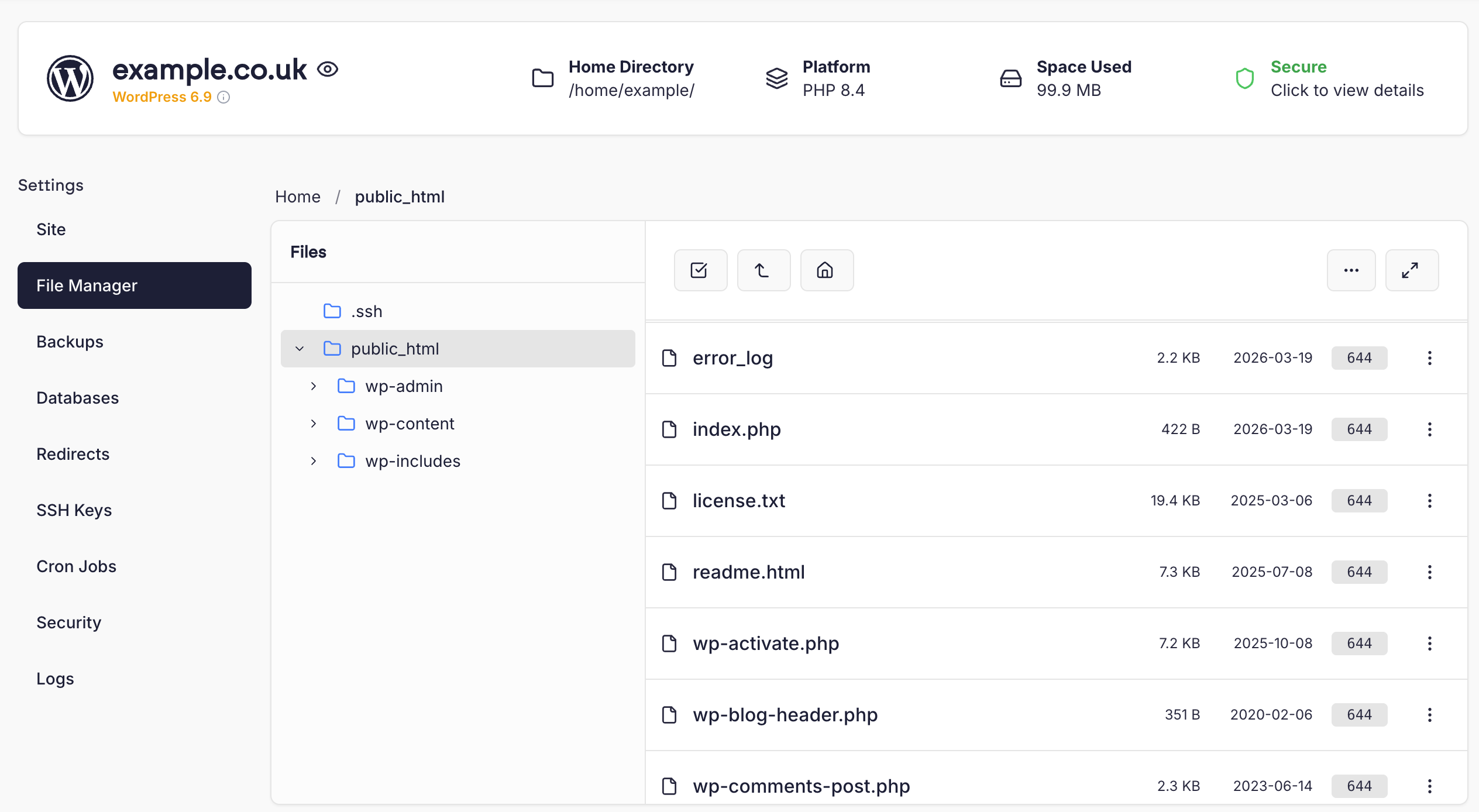 The file manager can be expanded to fill the dashboard window by clicking the Full Screen toggle on the right hand side of the toolbar.
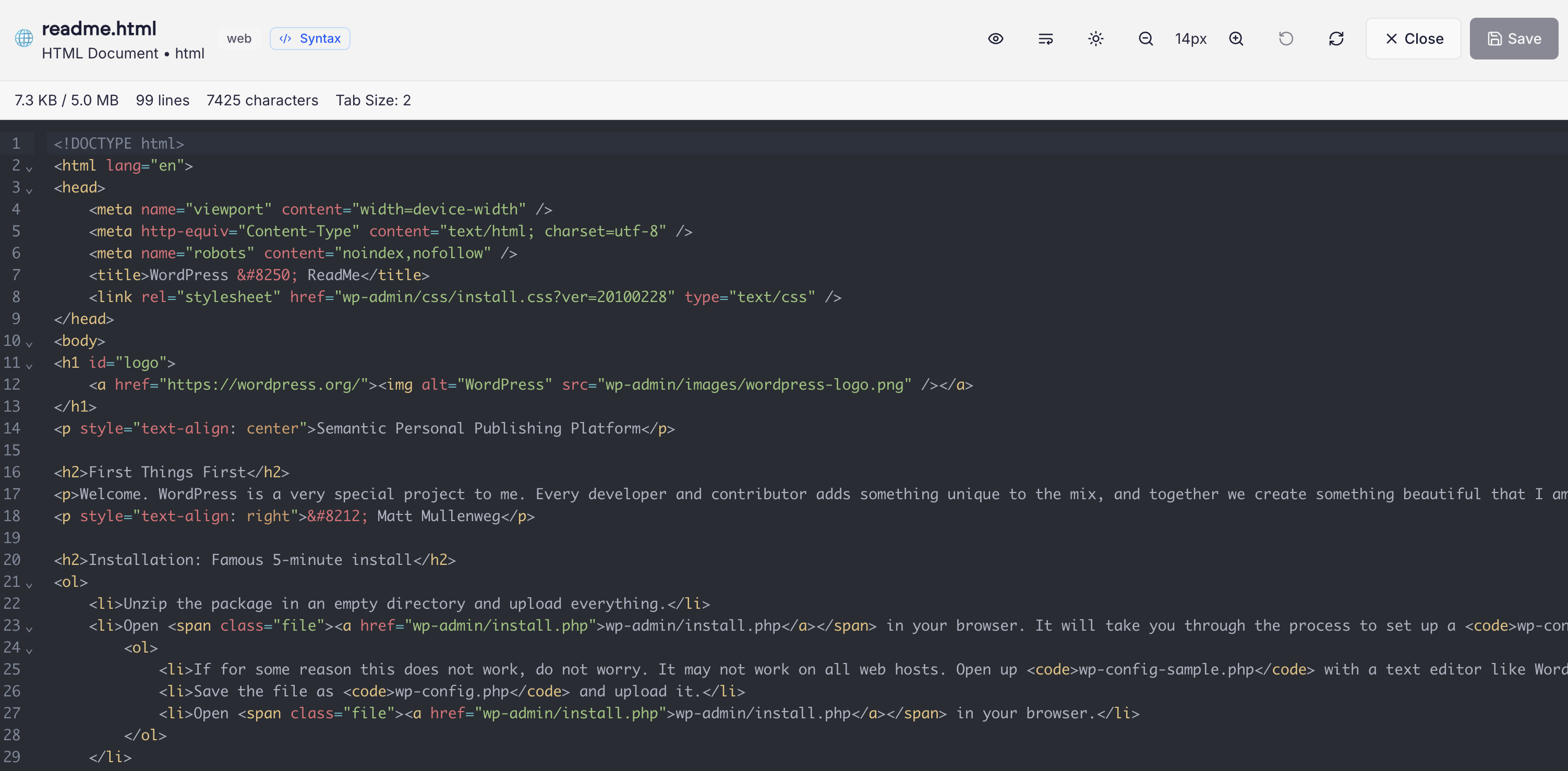 The code editor automatically opens the file manager in full screen mode.